

Similarly to everyone else, a large portion of my time has been taken up by exploring possibilities with GenAI and Copilot Studio. Recently, I decided to test out it’s capabilities by adding in translation into the mix. In this example, I will give our end user the option to select a language and have our chatbot respond in the chosen language. So our conversation flow will look something like this:

In the above screenshot, our user has selected the option for Spanish and our chatbot has responded to their question in Spanish! Now let’s take a look at how we achieved this.
This chatbot has Generative AI functionality turned on. You can learn more about turning this feature on here.
First, we need to modify the Conversation Start topic to allow our user to select their language.
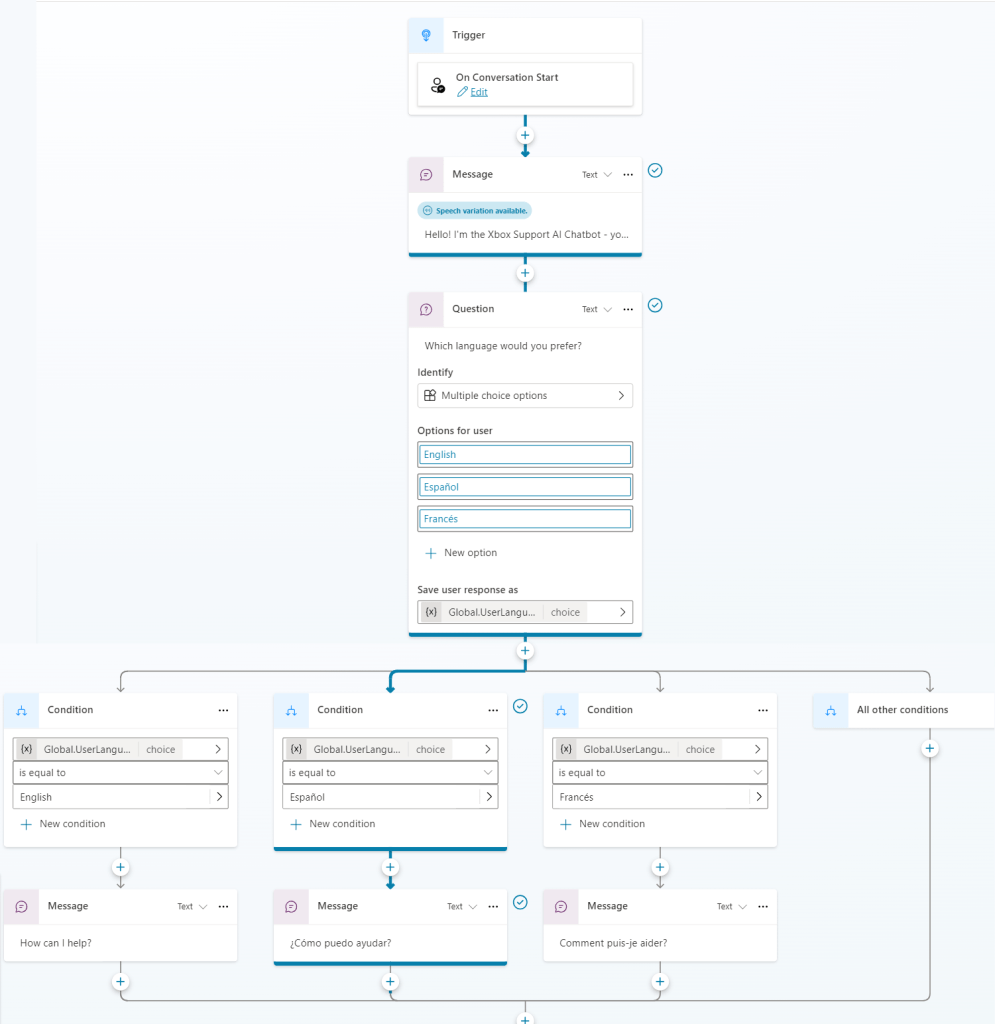
In the screenshot above you can see I saved the response as a Global Variable called UserLanguage. The variable must be global so other topics can read it.
Now we modify the properties of the Conversational Boosting Topic:


In here, we have the ability to tell the chatbot how to behave. In my example aove I have asked the bot to summarise it’s response in 60 words but also translate into the language stored in the UserLanguage variable. Make sure to save your topic before testing! By turning on “Track Topics” we can also watch the flow a user will take as they interact with your bot.

The results were surprisingly good! I was impressed by the quality of the translation. However, I did notice that asking the chatbot questions in the user’s selected language was prone to errors, so caution is recommended if implementing a solution like this. As always test, test, TEST! Looking forward to seeing how GenAI can help improve user experiences in the future!
 Mx Em D'Arcy